Colortec Creative Print Solutions produces a wide range of digital printing services that go above and beyond our customers' expectations. From banners to wall murals and everything in between, view our suite of services below.

We can cut and score simple and complex shapes in a variety of substrates including foamboard, wood, and acrylic.

Enhance your branding with custom printed decals. Everything from illuminated decals to floor decals.

We can hem your banner, add grommets to your coroplast signs, kit your campaign plus any other finishing services you might need.

Interesting pieces to let retail customers know about products and specials.

Usually made of paper, but sometimes thin plastic, posters are an economical way to advertise or decorate.

Ideal for providing safety and instruction in construction areas or for advertising in presentation centers, an assortment of site signage is available.

Interesting products for when you want to spice it up or when you want to use materials that are “extra”!

Stand out at an upcoming trade show with custom printed signage that will fit your budget and capture potential customers' attention.

Transit signage is seen by a huge audience all day, everyday. Make an impact with eye-catching graphics.

Ideal to promote, display or provide safety warnings, floor decals are a creative way to advertise your business or event.

Most often associated with hand painting, today’s murals can be printed on a variety of materials that will adhere to indoor and outdoor spaces.
"It has been a pleasure working with Chris and the team at Colortec for many years. They go above and beyond to ensure product quality and timelines are met. I highly recommend them for any printing needs."
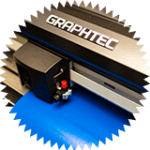
Flat beds, roll to roll printers and a CNC, oh my! Our tools and toys help make us a well-rounded printing and signage supplier.
Learn More
Colortec Creative Printing Solutions is a G7 Master Qualified Company. Learn more about what makes Colortec G7 Certified.
Learn More
We care about this spinning globe and are proud of the way we treat it! We wanted to better understand our environmental impact and ways to reduce it so, in 2013, we partnered with Climate Smart to work towards that goal.
Learn More
Climate Smart has developed a reduction plan targeting all our emission resources – electricity, heat, transportation, waste, paper consumption, and staff engagement – through various emission reduction initiatives.
Learn More